Stop Renaming 100+ Files Manually
Just Because You Need to Insert One
100% Confidential & Secure by Design
Built for professionals who handle sensitive documents — legal, medical, financial, and beyond.
Runs 100% in your browser
No data ever leaves your device. All processing is local.
No file uploads
We never see your files — ever. Nothing is sent to any server.
Only file names processed
Not content, not metadata. Just the filename strings you provide.
No account required to try
Try it right now without signing in.
Your data stays on your device. Always.
How to Use It
Simple, guided, and impossibly fast
Copy and Paste Your File Names
Copy and paste the names of your numbered filenames (we automate that for you). The tool automatically detects the pattern.
Choose Where to Insert
Tell the tool where you want to add new files. As many new positions as you like.
Generate & Apply
Preview your changes, then automatically rename your files with a couple of clicks! It's that simple!
Try It Now
Test the tool with up to 10 files. No sign-in required.
Quick Start Guide
Follow these steps to get your file list from PowerShell
- 1.In your file explorer, navigate to the folder containing files you want to renumber.
- 2.Hold Shift on your keyboard and right-click on the folder containing the files you want to renumber
- 3.Select "Open PowerShell window here"
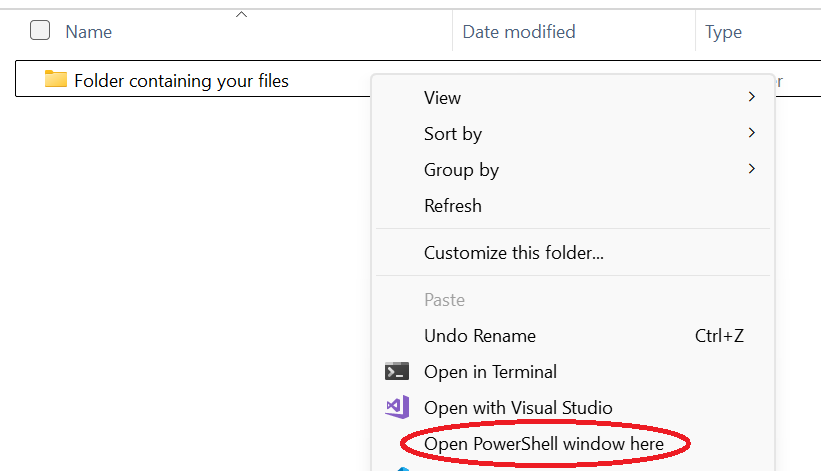
- 4.Type
Get-ChildItem -Nameand press Enter - 5.Select all of the output (click and drag with your mouse) and copy it (Ctrl+C)
- 6.Paste the filenames into the text box below
Why Teams Switch to Renumber Files
Fewer mistakes, faster turnaround, and the privacy controls professionals need.
No uploads. Filenames stay on your device.
Handle large numbered sets without manual rework.
Preview every rename before applying changes.
Who It's For
Built for professionals who work with numbered file sequences
Legal Professionals
Exhibits, annexures, appendices, and court bundles. Keep your file sequences intact when new evidence arrives.
Photographers & Media
Photo sequences, video clips, audio files. Insert missing shots without manual renaming.
Office & Admin
Invoices, reports, project files. Keep numbered documents organized when the sequence changes.
Simple, Transparent Pricing
Start free, upgrade when you need more
Explore By Use Case
Find the solution that matches your workflow
Renumber Files
Need to renumber any type of files in a sequence? Whether you're managing documents, photos, or project files, our batch renumbering tool makes it effortless to insert new files and automatically shift the rest.
Renumber Legal Exhibits
Legal professionals: insert new exhibits, annexures, or appendices into your court bundles without manual renumbering. Safe for confidential matters—all processing happens locally in your browser.
Increment File Numbers
Add +1 (or more) to file numbers starting from any position. Perfect when you need to create space in your numbered sequence for new files without renaming everything manually.
Insert Into Numbered Sequence
Have files numbered 1–50 and need to insert at position #15? We automatically shift files 15–50 to 16–51. Zero manual work, zero errors, complete in seconds.