Confidentiality Built In — Nothing Leaves Your Browser
Built for legal professionals handling confidential matters — client files, court bundles, and privileged documents.
Runs 100% in your browser
No data ever leaves your device. All processing is local.
No file uploads
We never see your files — ever. Nothing is sent to any server.
Only file names processed
Not content, not metadata. Just the filename strings you provide.
No account required to try
Try it right now without signing in.
Your data stays on your device. Always.
Interactive Demo
Try It With Your Exhibit List
Paste up to 10 exhibit filenames and preview the renumbering. No sign-in required.
Quick Start Guide
Follow these steps to get your file list from PowerShell
- 1.In your file explorer, navigate to the folder containing files you want to renumber.
- 2.Hold Shift on your keyboard and right-click on the folder containing the files you want to renumber
- 3.Select "Open PowerShell window here"
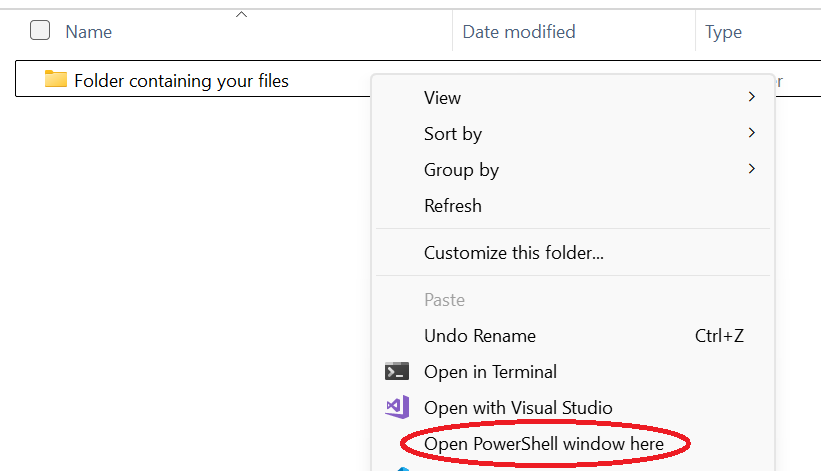
- 4.Type
Get-ChildItem -Nameand press Enter - 5.Select all of the output (click and drag with your mouse) and copy it (Ctrl+C)
- 6.Paste the filenames into the text box below
Works With All Legal Document Types
ExhibitsAnnexuresAppendicesAttachmentsCourt BundlesDiscovery DocumentsEvidence FilesTrial Exhibits
Stop Renumbering Exhibits Manually
3 free uses. No credit card required. Works with confidential matters.
Frequently Asked Questions
Yes! Renumber Files is specifically designed for legal professionals who need to insert new exhibits into existing numbered sequences. It handles exhibits, annexures, appendices, and any numbered document bundle.
Yes. Renumber Files only processes the filenames you paste — it never accesses your actual file contents. All processing happens locally in your browser, so confidential filenames never leave your device. No data is uploaded to any server.
No problem. You can specify multiple insert positions in a single operation. For example, insert new exhibits at positions 5, 12, and 20 all at once, and we'll calculate the correct renumbering.
Simply paste your list of numbered filenames, specify where you want to insert new files, and we generate PowerShell commands that rename everything automatically. The entire process happens in your browser — your filenames never leave your device.
Renumber Files works for both Windows and MacOS. The web interface works on any modern browser.
You get 3 free uses of the full tool after signing in. The public demo lets you test with up to 10 files without signing in. Pro subscribers get unlimited access for $9.50/year.